이번 글에는 몬스터 구현 했는지 정리 해보겠습니다.
처음 기본 세팅은 플레이어와 비슷하게 만들지만 다른것은
플레이어는 직접 입력을 해서 움직이지만 반대로 몬스터는 자동으로 움직여야 합니다.
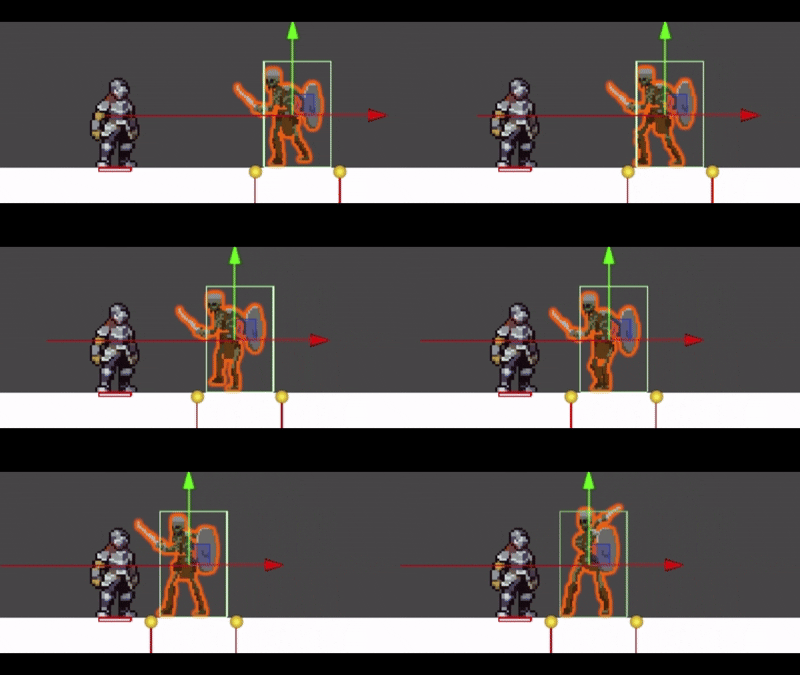
그렇기 때문에 플레이어를 인식하는 방식은 여러가지가 있지만 저는 레이케스트를 이용하여
플레이어를 인식하도록 하였습니다.
    void RayOn()
    {
        if (state == monsterState.hit || state == monsterState.dead)
            return;
        // 몬스터가 바라보는 방향 계산 (Sprite 방향에 따라 flipX 판단)
        Vector2 direction = GetComponent<SpriteRenderer>().flipX ? Vector2.left : Vector2.right;

        RaycastHit2D hit = Physics2D.Raycast(transform.position, direction, scanRange, enemyLayer);

        Debug.DrawRay(transform.position, direction * scanRange, Color.red);

        if (hit.collider != null && hit.collider.CompareTag("Player") && !(state == monsterState.attack))
        {
            state = monsterState.move;
            target = hit.transform.position;
        }
        else if (moveSearch)
            state = monsterState.move;

    }
몬스터가 바라 보는 방향에 따라서 Ray의 방향이 달라집니다. 여기에서 Ray가Tag가 Player인 오브젝트에 충돌한다면
몬스터의 상태를 monsterState.move 로 변경 합니다.
    void Move()
    {
        if(state == monsterState.attack || state == monsterState.hit || state == monsterState.dead)
            return;

        animator.SetBool("Walk", true);

        float distance = Vector2.Distance(transform.position, target);

        if(distance >= scanRange)
        {

            if (moveSearch)
            {
                moveTime += Time.deltaTime;
                if (moveTime > searchTime)
                {
                    moveSearch = false;
                    moveTime = 0;
                    state = monsterState.idle;
                    animator.SetBool("Walk", false);
                    return;
                }
                bool flip = GetComponent<SpriteRenderer>().flipX ? true : false;
                if(flip)
                    secrchMove.x = gameObject.transform.position.x - 2;
                else
                    secrchMove.x = gameObject.transform.position.x + 2;

                Vector2 directions = (secrchMove - transform.position).normalized;
                rb.velocity = new Vector2(directions.x * moveSpeed, rb.velocity.y);
                return;
            }
            else
            {
                state = monsterState.idle;
                animator.SetBool("Walk", false);
                return;
            }

        }

        else if (distance <= attackDistance)
        {
            rb.velocity = Vector2.zero;
            state = monsterState.attack;
            moveSearch = false;
            return;
        }

        Vector2 direction = (target - transform.position).normalized;
        rb.velocity = new Vector2(direction.x * moveSpeed, rb.velocity.y);

    }
여기에서 float distance = Vector2.Distance(transform.position, target); 를 이용하여 충돌 대상의
거리와 몬스터의 현재 위치를 계산하고 계산한 값이 attackDistance 보다 작으면 몬스터의 상태가 monsterState.attack
으로 변경이 됩니다.
'유니티 개발 > 사이드 뷰 게임' 카테고리의 다른 글
| Unity 2D 스크립터블 오브젝트 생성 (0) | 2025.07.18 |
|---|---|
| Unity 2D hit,dead 구현 (0) | 2025.07.18 |
| Unity 2D 캐릭터 공격 구현 (0) | 2025.07.17 |
| Unity 2D 애니메이션 - 애니메이션 구현 (0) | 2025.07.17 |
| Unity 2D 애니메이션 - 애니메이션 생성 (0) | 2025.07.17 |